

How Databases Actually Store Your Data
You've been using databases for years. You have no idea how they work.

Happy Friday Friends,
This week has been a lot. Between sprints, client calls, and trying to keep my head above water as a full-time student and founder, I keep coming back to the stuff that actually grounds me, the fundamentals. The stuff nobody teaches you in a bootcamp or a YouTube tutorial but that makes everything else click once you know it.
So today we’re going back to basics. Not “what is a database” basics. More like... “what is actually happening on disk when you hit save” basics.
Most of us use databases every single day. We write queries, set up migrations, add indexes when things get slow, and call it a day. But if you asked me two years ago how a database stores data at the file level, I would’ve said something vague about tables and moved on.
I don’t want that for you. So let’s get into it.
First: Forget the Table Mental Model
When you think “database,” you probably picture a spreadsheet. Rows and columns. Clean and organized. That mental model is useful for writing SQL. It is not what’s actually happening.
Your database doesn’t store a spreadsheet. It stores pages.
A page is a fixed-size block of data, usually 8KB or 16KB depending on the database. PostgreSQL uses 8KB. MySQL’s InnoDB uses 16KB. Every single thing your database touches (rows, indexes, metadata) lives inside one of these pages.
When you insert a row, the database finds a page with enough free space and writes it there. When you read a row, the database loads the entire page that contains it into memory, even if you only asked for one column.
This is why column selection matters more than people think. Pulling SELECT * when you only need two fields isn’t just wasteful on the wire. It’s loading full pages into memory that contain data you’re going to ignore. At scale, that adds up fast.
The Heap File
All those pages have to live somewhere. That somewhere is called a heap file.
A heap file is just a flat collection of pages stored on disk. No order. No sorting. You insert a row, it goes wherever there’s space. That’s it. The heap doesn’t care about your primary key. It doesn’t care about your ORDER BY. It’s just a pile of pages.
This is actually fine for small tables. Scan the heap, find your data, done. But as your data grows, scanning every single page to find the rows that match your WHERE clause becomes brutally slow. A million rows means potentially thousands of pages to scan. You need a smarter way to find things.
That’s where indexes come in.
B-Trees: The Real MVP
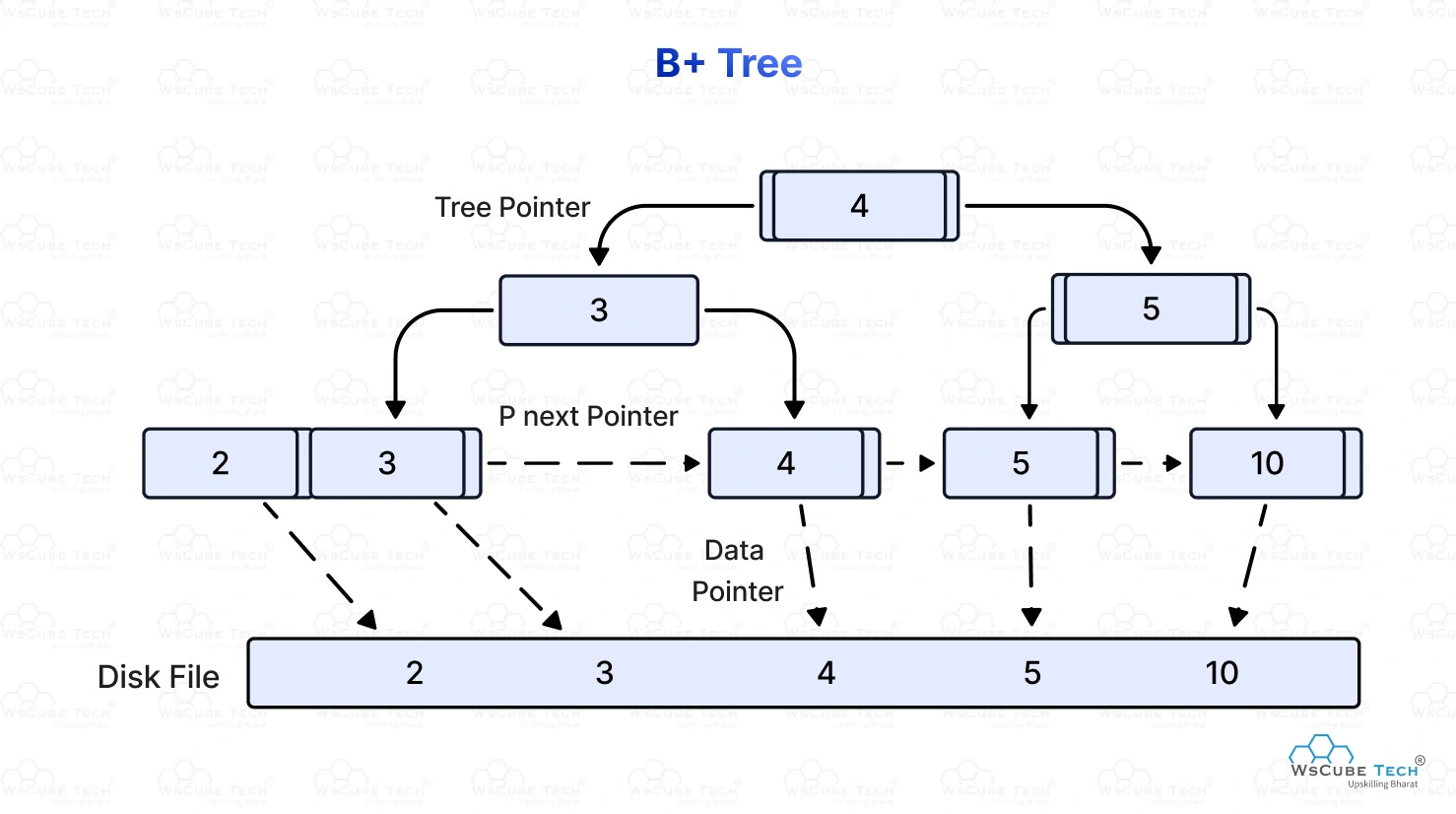
Almost every index you’ve ever created is backed by a B-tree. It’s the data structure that makes databases fast and it’s one of the most elegant ideas in computer science.
Here’s the concept. A B-tree is a self-balancing tree where every node holds multiple keys and pointers. The keys are your indexed column values, sorted. The pointers either point to child nodes or, at the leaf level, to the actual heap page where the row lives.
When you search for a value, the database starts at the root, compares your search value to the keys in that node, follows the right pointer, repeats at the next level, and keeps going until it hits a leaf. Leaf found, pointer followed, heap page loaded, row returned.
Instead of scanning thousands of pages, you’re making maybe 3 or 4 comparisons down the tree. For a table with millions of rows. That’s why indexes feel like magic. They’re not magic, they’re just a really well-designed lookup structure that the database maintains alongside your actual data.
The “self-balancing” part matters too. As you insert and delete rows, the B-tree rebalances itself so no path from root to leaf ever gets too long. The tree stays shallow. Lookups stay fast.
But it’s not free.
The Hidden Cost of Indexes
Every index is a separate B-tree that lives in its own set of pages on disk. When you insert a row, the database doesn’t just write to the heap. It writes to every B-tree that indexes columns on that table. Same for updates and deletes.
So if you have five indexes on a table, a single INSERT becomes six write operations. That’s why you don’t just throw indexes on every column and call it a day. You’re trading write performance for read performance. On a read-heavy table? Great trade. On a table getting hammered with inserts? You’ll feel it.
This is also why index maintenance matters. Over time, pages in a B-tree can become partially empty as rows get deleted. The tree develops what’s called fragmentation. Your queries start reading more pages than they need to. This is why VACUUM exists in Postgres and why regular index maintenance is a real production concern, not just a DBA thing.

Buffer Pool: Why RAM Changes Everything
Here’s something that surprised me when I first learned it. Your database doesn’t read from disk every time you run a query. It reads from memory.
Every database has a buffer pool (Postgres calls it the shared buffer cache). When you request a page, the database checks if that page is already in the buffer pool. If it is, it reads from there. If it isn’t, it loads the page from disk into the pool, then reads it.
Disk reads are slow. We’re talking milliseconds. Memory reads are nanoseconds. Orders of magnitude faster. So a database that’s “warm” — meaning its buffer pool is full of frequently accessed pages — feels completely different from a cold one.
This is why database performance tuning so often comes back to memory. Giving your database more RAM means more pages fit in the buffer pool, which means fewer disk reads, which means faster queries. It sounds obvious until you realize most people go straight to index tuning when their queries are slow without ever checking how much of their working set actually fits in memory.
Write-Ahead Log: How Your Data Survives a Crash
One more piece of this that’s worth understanding: how databases handle writes safely.
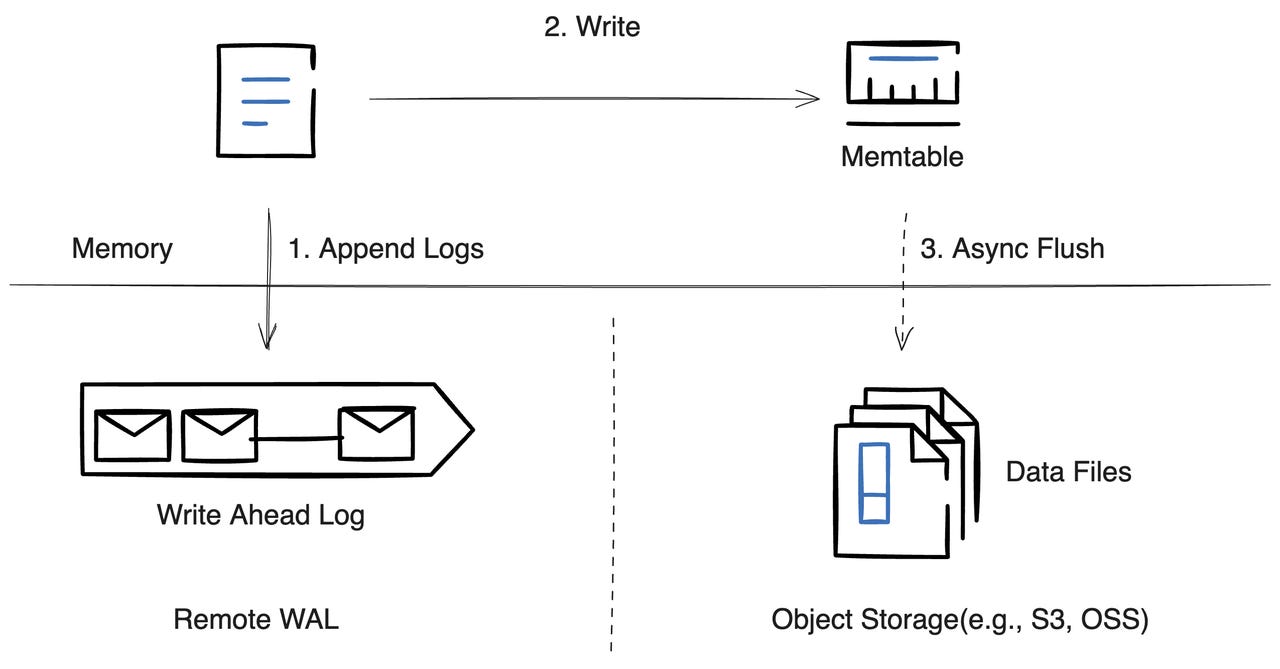
When you commit a transaction, the database doesn’t immediately write your changes to the heap file. That would be slow and dangerous. Instead it writes to the Write-Ahead Log (WAL), which is a sequential append-only log on disk.
Sequential writes are dramatically faster than random writes, because the disk head (or the SSD controller) doesn’t have to jump around. The WAL is just “append the next entry.” Fast and safe.
Once the WAL entry is written, the commit is considered durable. Even if the server crashes a second later, the WAL survives. When the database restarts, it replays the WAL and gets back to a consistent state. Your data isn’t lost.
The actual changes to the heap file and the B-tree pages happen asynchronously, in the background, as part of a process called checkpointing. The WAL is essentially a safety net that lets databases be both fast and crash-safe at the same time.
I know some of this might feel theoretical. Like, why do you need to know about B-trees and heap files if you’re just building apps?
When you understand this stuff, you stop guessing. You stop throwing indexes at slow queries hoping one sticks. You start thinking about access patterns before you design your schema. You understand why your database gets slow under heavy writes. You understand why that one query that worked fine in development falls apart in production with real data.
The fundamentals don’t just make you a better database user. They make you a better engineer. And honestly, they make you a better consultant and advisor to clients too, because you can actually explain what’s happening and what it’ll cost to fix it.
Most devs skip this layer entirely. Don’t be most devs.
Anyway, that’s your Tuesday’s brain food. If this clicked for you, share it with someone who’s been blindly adding indexes and wondering why their writes are slowing down.
As always, I’m here, building in public, figuring it out one sprint at a time, and genuinely grateful you’re on this journey with me.
Let’s Build It Beautifully,
Fab